Last updated: August 11, 2026
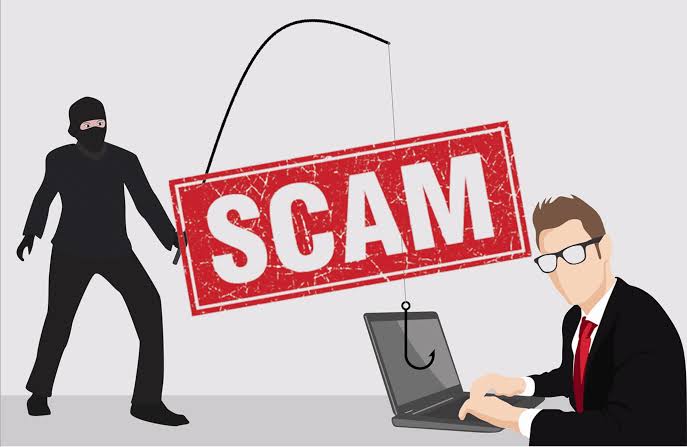
Quick Answer: Phishing is a scam that uses a fake message to steal passwords, codes, card details, or money; in 2023, the FBI’s IC3 received 298,878 phishing complaints, making it one of the most reported cybercrime types. Got a sketchy email, text, or phone call? Then the question is pretty simple: what is phishing? simple guide how phishing scams work will show you how phishing works, what the warning signs look like, and what to do next.
Key Facts / Key Takeaways
- Phishing is impersonation plus a request for action.
- It can arrive by email, text, phone call, social media DM, shared document, or fake login page.
- Urgency is a common trick because it cuts down on second-guessing.
- The safest response is to verify via a different route you trust.
- The FBI’s IC3 logged 298,878 phishing complaints in 2023.
- The FTC and CISA both publish practical phishing guidance.
I write about online safety and fraud, so I spend a lot of time turning scam tactics into plain language people can actually use. What is phishing? simple guide how phishing scams work is the question here, and the short answer is blunt: phishing tries to make a fake message feel real.
What Phishing Is, in Plain English
A phishing message is fake, and it is built to make you move fast. Sometimes the sender pretends to be your bank, a delivery company, your boss, a streaming service, or even a friend; the aim is to get you to click a link, open a file, hand over a code, or type sensitive details into a bogus login page.
Those attacks work because they borrow the look and wording of real organizations. Logos get copied. Email layouts get copied. Website styling gets copied. Some are clumsy and obvious. Others are slick enough to catch a distracted person on a rough day.
Not just email. I’d count these as phishing too, and if you are unsure, it is smart to check with your organization or a cybersecurity professional:
- Fake login pages sent by text message
- Social media DMs asking you to “verify” your account
- Voicemail or phone calls that pressure you to “confirm” information
- Emails with malicious attachments
- Calendar invites or shared documents that lead to fake sign-in pages
Deception plus urgency. That is the pattern. The scammer wants you moving before your brain gets a vote.
For a reliable overview of common tactics, I’d also point you to the U.S. Federal Trade Commission’s phishing guidance and the Cybersecurity and Infrastructure Security Agency’s advice on phishing:
- https://consumer.ftc.gov/articles/how-recognize-and-avoid-phishing-scams
- https://www.cisa.gov/topics/cyber-threats-and-advisories/phishing
How Phishing Scams Work
Usually, phishing follows the same playbook.
Start with a believable hook. “Your account is locked,” “a package is waiting,” “there’s a problem with your payment,” or “you need to review this document” are all classic examples.
Then the pressure ramps up. Good phishing messages lean hard on urgency because urgency shuts down second-guessing. They may warn about fees, lost access, or account suspension.
Next comes the trap. The message asks you to:
- Click a link to a fake login page
- Open an attachment that installs malware
- Enter a password, security code, or card number
- Call a number that routes to the scammer
- Approve a login or money transfer you didn’t initiate
Going along with it lets the scammer steal your credentials, take over your account, make unauthorized purchases, or use your identity for other fraud.
A simple example makes it easier to see. You get an email saying your cloud storage is full and your files will be deleted unless you “sign in now.” It looks believable. The link takes you to a page that copies the real service. You type your username and password. Boom — the scammer has your login. Reuse that password somewhere else, and the damage can spread fast.
That is why phishing works so well. It does not need to break into a system if it can talk a person into opening the door.
The Real Difference Between Phishing and Other Scams
Phishing is impersonation. That is the split that matters.
A generic scam may promise fake prizes, bogus investments, or miracle refunds. Phishing, by contrast, pretends to be a trusted source and uses that trust against you. The scammer is not only pushing a lie; they are borrowing someone else’s identity so the lie feels safe.
Why does that matter? Because it changes what you watch for. With phishing, I focus less on the story and more on the source, tone, and destination. Who is asking? Where does the link go? Does the request match how that company usually contacts you? Is the message trying to push you past your normal routine?
Here’s the practical split, and the categories can overlap in real life:
- Phishing: impersonation plus a request for action
- Spam: unwanted messages, often annoying but not always dangerous
- Smishing: phishing by text message
- Vishing: phishing by voice call
- Spear phishing: phishing aimed at a specific person or workplace
- Whaling: phishing aimed at executives or high-value targets
The label matters less than the behavior. If someone is trying to get you to reveal something or approve something under false pretenses, treat it as phishing unless a trusted source says otherwise.
Phishing: Who Should Actually Worry About It
Everyone should worry a little. Phishing does not only hit people who “aren’t careful.” Experienced users get caught too, because the scam often arrives at a stressful moment: during travel, at work, when a bill is due, or when an account needs attention.
Honestly, I’d say phishing is a serious concern if you:
- Use email for banking, work, shopping, or password resets
- Keep important accounts tied to one inbox or phone number
- Reuse passwords across services
- Handle client, payroll, or payment information
- Work in an organization where one mistaken click could expose other people’s data
Busy people are the soft spot. That is the awkward truth. Older adults, new employees, and anyone who does not know a company’s normal process as well are exposed too.
Who should not assume they’re safe? Anyone who thinks “I’d never fall for that.” Confidence can make a person less cautious, and scammers absolutely count on it.
The Honest Side-by-Side
If I had to compare the two defenses people lean on most, I’d frame them this way: spotting the scam yourself versus verifying by another route. The second one wins in real life because it does not depend on your mood, your attention, or how polished the message looks.
| Criteria | Spotting the scam by inspection | Verifying by another route | Winner for [condition] |
|---|---|---|---|
| Speed | Fast if the message is obvious | Slower, because you check elsewhere | Inspection for obvious junk |
| Reliability | Can fail when the scam is polished | Much stronger if you use a known phone number or official app | Separate route for real decisions |
| Works under stress | Weak when you are rushed or distracted | Better, because it forces a pause | Separate route when urgency is high |
| Skill required | Needs pattern recognition | Needs discipline, not detective work | Separate route for most people |
| Best use | Filtering obvious spam and obvious fakes | Confirming anything involving money, passwords, or codes | Depends on the risk level |
| Failure mode | One convincing detail can override suspicion | You may still verify through a fake number if you use the contact info in the message | Separate route, if you source it yourself |
| Cost | No tool needed | No tool needed either, just a habit | Tie |
| Best for | Simple inbox cleanup | Any request that could cause financial or account damage | Separate route for sensitive requests |
My clear recommendation: if a message asks you to sign in, pay, approve, or share a code, do not trust the message itself. Open the app, type the website address yourself, or call the company using a number from its official site or your card. That small detour knocks out a huge share of phishing attempts, though no method is perfect every time.
The Specific Situations Where Phishing Wins
Phishing gets stronger when the attacker knows the context. A mass email is one thing. A note that mentions your bank, your employer, your package, or your recent purchase is harder to brush off.
This is where phishing stops looking like the old “Nigerian prince” joke. The modern version often passes for ordinary business communication:
- A payment reminder that looks like a vendor invoice
- A shared file from a colleague’s compromised account
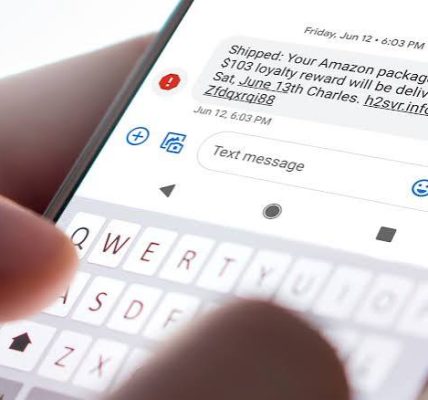
- A text about a delivery you were actually expecting
- A payroll or HR message asking you to review direct deposit details
- A security alert that uses the right company name and branding
It also wins when people are supposed to move quickly. Many systems now send one-time codes and approval prompts. Useful? Yes. But it opens a new door: a scammer can pressure you to read back a code or approve a sign-in you did not start.
The real power here is social engineering, not technical wizardry. The scammer watches how people react to authority, fear, routine, and convenience. The message does not need to be perfect. It only needs to feel believable for a moment. That’s the whole trick.
Slow it down, and it starts to wobble. When the request is urgent, unusual, or money-related, that is exactly when you should distrust it most.
Our Verdict: Which One to Choose and Why
Choose separate-channel verification if the message involves passwords, money, login codes, account changes, or attachments. Choose spotting by inspection if you are only sorting obvious junk and nothing in the message can hurt you if you are wrong. Not if you are so rushed that you cannot pause and check from a source you trust.
That is the call I would make every time. A person can learn to notice classic phishing signs, but I would not rely on that skill for anything sensitive. The safer habit is simple: never use contact details, links, or phone numbers from the message itself when the stakes are real.
If you are helping someone else, especially a parent, teenager, or new employee, this is the rule I’d teach first: stop, ignore the link, and verify from the official app or known website. Boring? Sure. Effective too.
When to Reconsider This Choice Entirely
A few situations change the usual advice.
-
The account is already compromised.
Clicked a phishing link or entered a password? Don’t just delete the message. Change the password from a clean device, sign out of other sessions if the service allows it, and contact the company’s support channel. If money may be involved, contact your bank promptly. -
The message came through a work account.
Report it to your security or IT team before forwarding it widely. A compromised coworker account can spread fast. -
The scam uses a phone call or text code.
Be extra careful. A real company rarely needs you to read back a one-time code to a live caller. If someone asks, stop the call and contact the organization yourself. -
You already responded.
The next step depends on what you shared. A password alone calls for a password reset. A card number calls for the card issuer. A government ID or tax information may require broader fraud protection. If sensitive personal data is involved, consider getting professional guidance from the relevant institution.
The point is not panic. The point is to cut off the scammer’s access as fast as possible.
How to Spot a Phishing Scam Before It Works
If you want one practical checklist, I’d use this one, and if you are not sure, consult your organization’s security team or a cybersecurity professional:
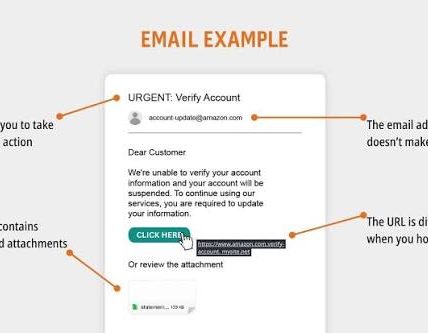
- Check the sender, but do not trust the display name alone
- Hover over links on desktop or press and hold on mobile to inspect the destination
- Look for urgency, threats, or “act now” language
- Be skeptical of attachment requests you did not expect
- Treat requests for codes, passwords, or payment details as dangerous
- Verify by another route when money, access, or identity is involved
A message can look polished and still be fake. The most useful habit is to pause before you react. Phishing depends on speed. Your defense depends on friction.
FAQ
Is phishing only done by email?
No. Phishing also happens by text message, phone call, social media DM, fake websites, and even shared documents or calendar invites.
What should I do if I clicked a phishing link?
If you did not enter anything, close the page and run a security scan if you can. If you entered a password, change it right away. If you entered banking or card details, contact the financial institution immediately.
How can I tell if a login page is fake?
Check the address carefully, but do not stop there. Scammers can use lookalike domains and copy the page design. The safest move is usually to avoid the link and open the service through a saved bookmark or the official app.
Why do phishing scams still work?
Because they use urgency, familiarity, and fear. People are more likely to act fast when a message appears to come from a trusted source.
Should I report phishing messages?
Yes. Report them to the company being impersonated, your email provider or phone carrier when possible, and your workplace security team if it happened on a work account.