Last updated: August 11, 2026
Quick Answer: Phishing scams are fake messages built to fool you into handing over passwords, money, or access to an account. The safest move is to confirm any request through a separate channel before you click, reply, or log in. Usually, one habit shuts the attack down in under 2 minutes.
Key Facts
- Phishing scams can arrive by email, text, phone call, social media DM, QR code, or fake login page.
- The highest-risk actions are entering a password, sharing a one-time code, approving a login prompt, opening an attachment, or paying a fake invoice.
- Email phishing is often easier to inspect on a desktop, while smishing is often more abrupt and impulsive on a phone.
- A good defensive rule is simple: do not act inside the message.
- For official guidance, see the FTC on phishing, CISA on phishing, and NIST SP 800-63B.
- Password managers, multi-factor authentication, and out-of-band verification reduce risk, but they do not replace judgment.
- If you clicked or replied, change the affected password immediately and check recent sign-in activity.
Phishing scams are fake messages built to fool you into handing over passwords, money, or access to an account. This phishing scams — complete guide is for readers who need practical decisions, not scare tactics; the topic matters because phishing still succeeds by copying ordinary communication with unnerving accuracy. Short version? Stop trusting the message itself and verify the sender through another channel before you click, reply, or log in. I write about fraud and digital safety for readers who need practical decisions, not scare tactics, and phishing is one of the few threats that still works because it copies normal communication so well.
What Phishing Scams Actually Are, and Why They Still Work
Spam with a bad link? Not quite. Phishing is a social-engineering attack that borrows the look, tone, and urgency of a real institution so you act before you think. The scam can arrive by email, text, phone call, social media DM, QR code, or even a fake login page that looks like your bank, work portal, or delivery service.
Usually, the setup is the same: the attacker wants one small move that hands over control. That might mean entering a password, approving a login prompt, opening a malicious attachment, sending a one-time code, or paying a fake invoice. Urgency does most of the heavy lifting. Fear, reward, routine — same trick, different mask. “Your account is locked.” “A package is waiting.” “Payroll needs confirmation.” “You have a refund.” Those lines matter because people are most exposed when they are busy.
Honestly, a lot of generic advice gets this wrong by treating phishing as a tech problem first. It is mostly a trust problem. The scam lands in a place you already trust: your inbox, your phone, your calendar, your browser, your payment app. Once the channel feels normal, the fake request feels normal too. For a professional review of a suspicious message, consult your IT team, bank, or carrier, and compare it with the FTC and CISA guidance: FTC on phishing and CISA on phishing.
The good news? Phishing is predictable. It can be polished, but it still depends on getting you to skip verification. That gives you leverage of your own: when a message wants action, slow down and verify the request independently. For banks, payment systems, and account-security guidance, the U.S. Federal Trade Commission and CISA are both reliable starting points: FTC on phishing and CISA on phishing.
The Real Difference Between Email Phishing and Smishing
Email phishing and smishing are both phishing, but I do not treat them as the same risk. Email phishing wins by blending into a crowded inbox. Smishing, the text-message version, wins by feeling immediate and personal. If I had to pick which one catches a rushed person more often, I’d choose smishing: a text is easier to skim, easier to tap impulsively, and more likely to arrive while someone is distracted. If you are unsure how to judge a suspicious message, consult a professional or use the FTC and CISA guidance linked above.
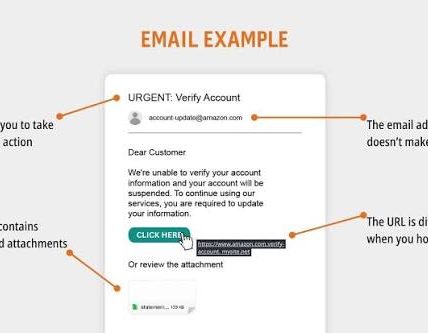
Email phishing usually carries more detail. It may spoof a company name, mimic a receipt or password alert, and send you to a fake login page. It often relies on a link and a sense that you should “review” something. Email also allows for a more elaborate bluff because attackers can format the message, hide the destination behind a button, and imitate corporate language.
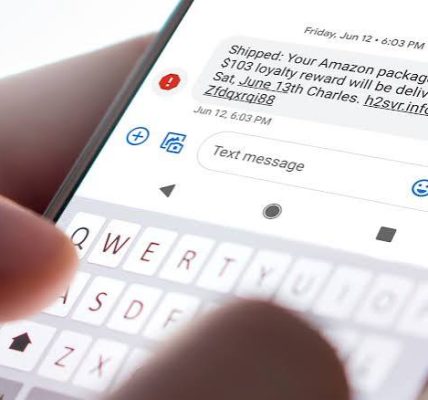
Smishing is cruder; oddly, that can make it more dangerous. Text messages usually give you a smaller window to think. A fake delivery notice, account warning, or bank fraud alert can get a tap before the target checks the sender. That simplicity is the point. People read texts as if they were inherently more personal and more current than email.
What the victim actually faces is not technical sophistication. It is the kind of mistake the scam is trying to provoke. Email phishing often aims for credential theft and malware. Smishing often aims for quick clicks, one-time codes, or payment. Both can lead to account takeover, but smishing tends to be quicker and more impulsive. That math stops working fast once you slow down.
A generic guide leaves out the practical consequence: the defense changes a bit. With email, I inspect the sender, hover over links, and check whether the message is trying to move me to a login page. With texts, I assume any urgent link is suspicious until I verify it through the official app or website. I never trust a phone number or URL inside the message if the issue matters. I look up the official contact path myself.
Email Phishing: Who Should Actually Use This Advice (and Who Shouldn’t)
Email-phishing advice is for anyone who uses email for money, work, or identity-sensitive accounts — which is almost everyone. The people who benefit most are usually those handling multiple logins, online banking, payroll, scheduling, or customer-service portals. When your inbox is part of how you move money or approve work, you need a stricter habit than “don’t click weird stuff.”
The strongest part of email-phishing defense is also the plainest: verify the sender, then verify the request. That means checking the actual address, not just the display name. It means being suspicious of reply-to addresses, attachment prompts, and urgent login links. It also means treating unexpected attachments as a problem until proven otherwise. A PDF can hide a trap. A document can contain a malicious link. A counterfeit “shared file” notice can route you into a counterfeit sign-in page. If you are unsure, consult a professional or verify through the organization’s official support channel.
This advice is especially useful for people who use desktop mail clients or webmail on a large screen. On a bigger display, the address line, link destination, and message headers are easier to inspect. That matters because a lot of phishing depends on small visual tricks. A clean logo can hide a crooked domain. A long, believable signature can hide a mismatched sender.
The weak spot is attention. When someone checks email on autopilot, the advice loses force. That is why I would not rely on “just be careful” as a full defense. It helps, but it does not close the gap created by fatigue. The same is true for older adults, caregivers, and small-business employees who receive a lot of administrative email. They are not careless; they are overloaded.
Who should not rely on email-only judgment? Anyone juggling a high volume of messages and making fast decisions all day. In that case, I would choose a rule-based process instead: no links from unexpected messages, no attachments unless expected, and no password entry from an email prompt. That sounds rigid because it is. Phishing is built for flexible people. A little rigidity is often safer.
Smishing: The Specific Situations Where It Wins
Smishing wins when speed matters to the attacker and distraction matters to the victim. I would be most cautious of text messages that claim a delivery problem, a bank alert, a missed toll payment, a voicemail, or an account security issue. Those categories work because they feel like routine life. You do not need to be scared to click; you only need to be busy.
The strength of smishing is that it collapses the distance between the message and the action. On a phone, the link is one tap away. The page opens in the same device you use for banking, messaging, and two-factor codes. That can make the fake page feel more believable, because it appears in the same environment as your real apps. Attackers know this.
Smishing is also harder to inspect casually. Short messages do not give you much room to analyze them. A fake shipping notice can look harmless. A fake security text can look like an automatic alert. That is why I think “does this look weird?” is too weak a test. Some smishing texts look completely ordinary. Better to ask whether you expected the message at all, and whether the request makes sense through the official app or website.
The downside is convenience. If you make the rule “never tap anything in a text,” you will sometimes spend an extra minute finding the real app or site. That is the trade-off. Fair enough. I think it is worth it because the cost of a false tap can be much higher than the cost of a slow check.
Smishing is not the right target for someone who insists on handling everything through text for convenience. If that is your habit, you are taking on more risk than you realize. I would choose a different workflow: use texts only as notifications, not as instructions. If a text says something needs action, open the service through a saved app or typed address, not the message.
The Honest Side-by-Side
Email and text phishing are cousins, but they are not equally dangerous in the same way. Email is better for long con jobs and fake documents. Text is better for urgency and impulse. A generic guide often says “watch for suspicious links” and stops there. That misses the practical difference: the medium shapes the mistake.
Here is the part I would actually want in front of me if I had to decide how careful to be in each channel.
| Criteria | Email Phishing | Smishing | Winner for [condition] |
|---|---|---|---|
| Speed of the scam | Usually slower, more layered | Usually quicker and more impulsive | Smishing for rushed moments |
| Chance to inspect sender details | Better on desktop, possible on mobile | Poorer, because people tap quickly | Email for careful review |
| Likelihood of urgent action | Moderate to high | Very high | Smishing for urgency traps |
| Common bait | Invoices, account alerts, files, login prompts | Delivery notices, bank alerts, tolls, voicemails | Tie, depending on your routine |
| Ease of hiding a fake link | High in formatted messages | High, but fewer clues | Email for more elaborate disguise |
| Risk of credential theft | Very high | Very high | Tie |
| Risk of one-tap mistakes | Moderate | High | Smishing |
| Best defensive habit | Inspect sender and type the site yourself | Ignore the link and open the app yourself | Depends on channel |
| Best for training new users | Good for teaching verification steps | Good for teaching “never tap under pressure” | Email for detailed training |
My verdict is simple: email phishing is easier to analyze, but smishing is easier to fall for. So the better defense is not choosing one channel to trust. It is building different habits for each one. The common mistake is treating texts as smaller email and email as bigger text. They reward different errors.
How to Spot a Phishing Scam Before It Spreads
Ignore the polish and inspect the request. That is the fastest way to spot phishing. I look for four things first: urgency, mismatch, unusual action, and off-channel pressure. When a message says there is a problem, ask yourself whether you knew about the problem already. When a message wants you to click, ask whether you can solve the issue by opening the real app yourself. When a message asks for a code, password, or payment, assume it is suspicious until verified.
The sender line matters, but not as much as many people think. Attackers can spoof display names. Logos can be copied. A clean design is not proof of legitimacy. The stronger clue is the destination. Does the link go where the message claims? Does the domain match the company exactly? Is the page asking for information it should already have? These checks catch more scams than judging by tone alone.
I would also watch for requests that try to move the conversation away from official systems. A fake tech-support message may ask you to call a number. A fake bank text may ask you to reply “yes.” A fake job offer may ask you to install software. That movement is deliberate. The scam works better once you leave the secure path and step into the attacker’s path.
A lot of people ask for a simple rule. My rule is this: when the message creates pressure and asks for action, do not act inside the message. Go around it. Open the company’s app, type the website yourself, or use a number from a statement or card, not from the message. If the issue is real, it will survive that detour.
What to Do Right Now If You Clicked or Replied
If you clicked a phishing link, replied to a suspicious message, or entered credentials, do not waste time deciding whether it “counts.” Treat it as an exposure and act immediately. First, change the password for the affected account from a device you trust. If you reused that password anywhere else, change those accounts too. Password reuse is one of the fastest ways a single mistake turns into a bigger breach.
Second, if the account uses multi-factor authentication, review your login methods and remove anything you do not recognize. If you shared a one-time code, assume the attacker may still be trying to complete a sign-in. If the message pushed you to approve an authentication prompt, check recent sign-in activity and revoke sessions you do not recognize.
Third, contact the real organization through an official phone number or app if money, payroll, tax, shipping, or customer data is involved. If a bank account or card number may be exposed, report it quickly so the account can be monitored or frozen as needed. For health, finance, or legal consequences, I would not wait to see if anything happens. I would call the official support line and ask for the next step.
Fourth, scan the device if you opened an attachment or installed anything. If you only clicked a link, the risk is lower than if you downloaded a file, but not zero. On work devices, tell your IT team right away. On personal devices, update the operating system and security software, then watch for strange logins, password reset messages, or new devices added to accounts.
The honest drawback here is that speed matters more than certainty. People often hesitate because they feel embarrassed. That delay helps the attacker. The right question is not “Was this definitely phishing?” It is “What is the safest next move if it was?” That question leads to faster recovery.
The Real Difference Between Prevention Tools and Human Habits
Prevention tools help, but they are not the whole answer. I trust them as layers, not as a substitute for judgment. Spam filters catch some email phishing. Browser protections block some fake sites. Password managers reduce the chance that you type credentials into the wrong page because they autofill only on the right domain. Multi-factor authentication makes stolen passwords less useful. Those are real gains.
Still, the best tool has a weakness: it cannot decide whether an urgent request makes sense in context. That is where human habit matters. When you always type the real address for banking, never send a code to anyone, and treat unexpected attachments as radioactive until verified, you remove a lot of the attacker’s room to maneuver.
I also think password managers deserve more credit than they usually get in phishing discussions. One reason is practical: they only fill on the correct site, so they can act as a quiet warning when a fake login page tries to steal credentials. The drawback is that they require setup and discipline. If someone is not already using one, the change takes effort. But that effort pays off because it reduces both password reuse and copycat-login risk.
The main mistake is buying a tool and relaxing. Security software can help, but phishing succeeds by persuading the user to cooperate. No tool fully prevents a person from approving a fake login or sending a code to the wrong number. That is why I prefer a layered defense: tool support plus a rigid rule about verification.
For broader account-security guidance, the National Institute of Standards and Technology offers useful password guidance in its Digital Identity Guidelines, and the FTC has plain-language consumer advice on avoiding phishing.