Last updated: August 11, 2026
Quick Answer: In 1 minute, you can usually spot a smishing text by checking 3 things: urgency, a link or callback number, and a request for personal information. When a message pushes you to verify, pay, or “fix” something right away, and you cannot confirm the sender on your own, treat it as suspicious until proven otherwise. Simple rule. That is the basic rule for how to tell if text message is smishing scam behavior.
Key Facts
- Smishing is phishing by SMS, and the goal is usually one tap, one call, or one reply.
- A text that asks for a password, one-time code, card number, or Social Security number is a major red flag.
- Verify through the official app, bill, card, or website you type yourself, not through the text.
- A message can look real and still be fake; sender names and logos are easy to copy.
- If you clicked, replied, or shared data, act fast: change passwords, contact the institution, and review account activity.
A smishing text usually aims to rush you into one bad tap: a fake link, a fake login page, a fake payment, or a fake call-back number. Pressure first; checking later. In the context of how to tell if text message is smishing scam attempts, the pattern is pretty plain: pressure first, verification second, and no time to think. When the message pushes urgency, asks you to verify, pay, or “fix” something, and the sender cannot be independently confirmed, I would treat it as suspicious until proven otherwise.
What Smishing Looks Like When It’s Trying to Work
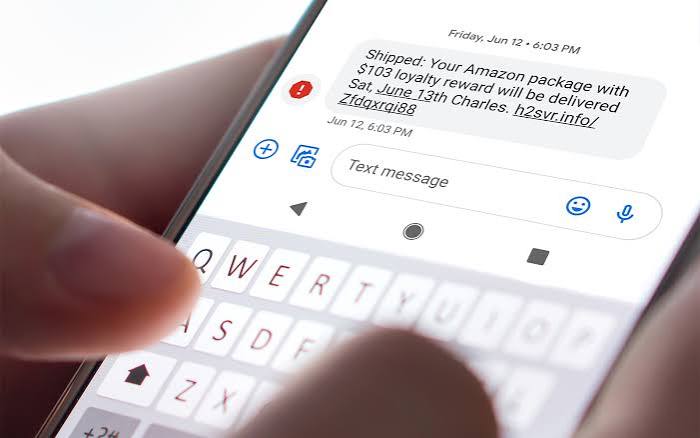
A package delay. A locked account. An overdue toll. A problem with delivery. Those are the hooks, and they are used for one reason: to get you to click before your brain catches up. That is the whole trick. Smishing is phishing by SMS, and the pressure usually comes from a fake deadline or a small amount of money that feels easier to handle than investigating.
Links are the real giveaway. Not the wording. A scammer can copy the logo, the tone, and even a real company name. What they usually cannot fake is a domain that matches the real organization. A text from “USPS” that points to a random web address, a misspelled brand, or a shortened link is a red flag. Real organizations can send texts, but they usually do not ask you to enter passwords, card numbers, one-time codes, or Social Security numbers through a link from an unexpected message.
Be extra cautious when the message asks you to reply “YES,” call a number, or download an app. That can be the first step in building trust, confirming your number is live, or moving the conversation off a channel where your carrier’s filters might catch it.
A good rule: when the text creates panic and the solution is inside the text, assume the text is part of the problem.
Quick check: if the message wants urgent action, uses a link, or asks for personal information, treat it as suspicious first and, if needed, consult a security professional or the organization’s official support page before acting. The FTC’s phishing guidance is a useful reference point: FTC phishing guidance.
The Fastest Ways to Check a Text Without Getting Burned
Want the fastest answer? Start by not tapping anything in the message. Use a separate channel you already trust: the company’s official app, the number on your card, or the organization’s real website that you type yourself. That matters because the scam often succeeds only when you use the scammer’s path.
So, should I get the text, I would take this route:
- Do not click the link, reply, or call the number in the message.
- Read the sender carefully. If it is a short code, alphanumeric sender name, or unknown mobile number, do not assume it is real.
- Check the message for urgency, payment pressure, gift cards, login requests, or code requests. Those are common scam cues.
- Open the company’s app or type the official website yourself in the browser. Do not use the text’s link.
- Sign in only through the real site or app and look for the alleged problem there.
- If the text claims to be from a bank, card issuer, or government office, use the number printed on your card, bill, or official notice to call back.
- Save a screenshot of the text before deleting it, in case you need to report it or explain a charge later.
For link checking, the simplest test is still the best one: hover if you can, or press and hold before opening if your phone shows the full URL. A real link should match the named organization and use plain spelling. A fake one often hides behind a typo, a strange top-level domain, or a link shortener. When the message is from a bank and the link goes to a domain that has nothing to do with that bank, the answer is no.
CISA also has a plain-language guide on suspicious messages: CISA phishing guidance. Handy background. But it is not a substitute for checking the specific text.
Quick check: when you can verify the claim only by using the message’s link or number, you have not verified it.
The 3 Conditions That Change Everything
Three things matter more than the sender’s name: what it asks for, whether you expected it, and whether the contact route is verified. When those three line up against the message, I would call it smishing until you prove otherwise.
| Situation | Best Path | Why Other Options Fail |
|---|---|---|
| The text asks you to click a link and sign in | Go to the company’s app or website directly | The link may go to a fake login page that steals your credentials |
| The text says there is a problem with a delivery, toll, or account you did not expect | Verify through your own account or known support number | Replying or clicking may confirm your number and expose you to follow-up scams |
| The text asks for a code, password, card number, or bank login | Do not respond; contact the institution through an official channel | Legitimate companies rarely need sensitive data by text |
| The text is from a familiar name but the number is new | Assume spoofing is possible and verify elsewhere | Display names can be faked, and a known brand name alone proves nothing |
Money texts get special treatment, and for good reason. No payment through a text link. No login from a text link. No one-time code shared with anyone who contacted you first. That one rule blocks a lot of scams. When the message says it is from your bank and asks you to “confirm” a transaction, ignore the text and open the bank’s app instead. If the app shows the same alert, it may be legitimate. If it does not, the text is likely bait.
There is one important exception: sometimes a real service sends a plain text alert that you already signed up for, like a delivery notice or two-factor code. Even then, the message should not ask for your password or full payment details. A verification code is meant to be entered into a site or app you opened yourself. It is not meant to be shared with the person who texted you.
For a second authoritative reference, the FBI’s IC3 site explains how phishing and smishing are used to steal information and money: FBI IC3 Internet Crime Complaint Center. Background only. Not a stand-in for checking the specific message.
Quick check: when the text can only be “confirmed” by giving information back to the sender, stop there.
If the Text Mentions a Package, Bank, Toll, or Government Notice
Package, banking, toll collection, government office — those themes show up again and again because they work. People expect to hear from those entities, and they fear a small problem turning into a bigger headache.
When a package text arrives, verify using the tracking number from the retailer’s order page or the carrier’s official site. Do not trust a “missed delivery” link from a random text. When a bank or card text arrives, use the app or the number on the back of the card. When a toll or parking notice appears, go to the agency’s official site from your browser, not from the message. When a government notice shows up, look for the same claim in your official account or on the agency site you navigate to yourself.
The details matter because these scams often borrow a real brand. A real notice usually includes an account number, order number, or case reference you can compare elsewhere. A fake one usually leans on panic and speed. Slow down for 30 seconds. The illusion cracks pretty fast.
Here is the path I would use for these messages:
- Identify the category: delivery, finance, toll, government, or account security.
- Ignore the text’s link and any phone number in the text.
- Open the official app or type the official site you already know.
- Log in and look for the same notice, charge, or alert.
- Compare the details: account number, transaction amount, order number, or case reference.
- If the alert is real, use the official site’s next step. If it is not there, delete the text and block the sender.
- If you already clicked, change any password you entered and contact the institution through a known channel right away.
Generic advice gets one thing wrong: it treats every suspicious text the same. They are not. A fake “delivery issue” often wants a small fee and a card number. A fake bank alert often wants your login or one-time code. A fake government notice often tries to scare you with penalties and then pushes you to a spoofed payment page. The response changes based on what the text wants from you.
Quick check: when the text ties to money, shipping, or government action, verify it only through the real account or agency site you open yourself.
When the Standard Advice Is Wrong
Busy people get legitimate alerts all the time, so “never click any text link” is too blunt to be complete. Some organizations do send useful texts. The problem is not that all text links are bad; the problem is that you cannot tell which ones are safe at a glance. Process beats tone, honestly.
When you already expected the message because you just ordered something, requested a login code, or signed up for alerts, then the text is less suspicious — but still not trusted. I would still verify by opening the app or site separately. When you did not expect any contact at all, the same wording becomes much more suspect.
A familiar name can still be a trap. When the message is from someone you know but the tone feels odd, the issue may be account takeover rather than smishing. A friend’s phone can be compromised, or their number can be spoofed. In that case, I would not click even if the name is familiar. I would call or message them through a different channel and ask a simple question only they would answer.
Work phones, shared devices, and managed accounts add another wrinkle. Some organizations route service alerts through SMS and have their own approved verification methods. When that applies, use the company’s normal security process instead of guessing.
The trade-off is simple: convenience versus certainty. Texts are fast, but speed is exactly why scammers use them. Certainty costs a few extra seconds. Worth it.
Quick check: when the message is expected or comes from a known name, that lowers suspicion but does not prove it is safe. For more background, the FTC and CISA both publish plain-language guidance on phishing and suspicious texts.
Edge Cases Where the Normal Advice Breaks Down
A few situations need a different call.
-
Situation: You already tapped the link.
What changes: The risk moves from “possible scam” to “possible compromise.”
What to do differently: Close the page, do not enter anything else, and if you typed a password or code, change that password through the real site immediately. Watch for new logins, password reset emails, or account alerts. -
Situation: The text contains a one-time code you requested.
What changes: The text itself may be legitimate, but the danger is who else is trying to use it.
What to do differently: Enter the code only in the app or site you opened yourself. Never read the code back to anyone who texted first. -
Situation: The sender name looks like a real company.
What changes: Display names can be misleading.
What to do differently: Treat the sender name as decoration. Check the actual number, then verify through the company’s official app or site. If you are unsure, consult the company’s support page or a security professional. -
Situation: The message threatens a small fee, not a huge loss.
What changes: Small-dollar scams often get attention because they feel easy to resolve.
What to do differently: Do not pay by text. Go straight to the official account or billing portal and confirm the charge there. -
Situation: The text is from a coworker, client, or vendor.
What changes: This may be business email compromise moved to SMS.
What to do differently: Verify the request by calling a known business number or using your company’s approved communication channel before acting. -
Situation: You are waiting for a real delivery or refund.
What changes: Expectation makes a scam look more believable.
What to do differently: Start with the order number or account you already have, not the link in the text.
Quick check: when anything about the message feels “almost right,” use a different channel to verify before you act.
What to Do If You Think It’s Smishing
If the text is fake or you are leaning that way, do not just delete it and move on if you clicked, replied, or entered anything. That is where a lot of people lose time.
- Stop interacting with the message immediately.
- If you entered a password, change it from the real site or app.
- If you shared a code, contact the affected service right away and ask about unauthorized access.
- If you entered card or bank information, call the card issuer or bank using the number on your statement or card.
- Check your accounts for unfamiliar logins, transfers, or purchases.
- Block the sender and report the text as junk or spam in your messaging app.
- File a report if the message involved money, identity information, or a likely fraud pattern. In the U.S., the FTC and your carrier’s spam-report tools are sensible starting points; for larger cases, the FBI’s IC3 is the right place to look.
When you did not click, your job is simpler: save a screenshot if you need one, report it, block it, and delete it. If the same sender keeps reappearing from different numbers, that is another sign you are dealing with a broader smishing campaign, not just one bad text.